

If you have ever wondered about the difference between IPTV and IFTV, you are not alone. As more people cut the cord and look for better ways to watch live TV, the search for IPTV VS IFTV keeps growing—especially among broadband and fiber users in India.
This detailed guide explains everything in simple language. You will learn what each service really is, the exact differences, real-world examples, pros and cons, and a clear answer to the question: which is the best for you?
The content is written for easy reading, with short paragraphs, clear headings, and practical advice so you can decide confidently.
What Is IPTV? A Clear Explanation
IPTV stands for Internet Protocol Television. It is a technology that delivers television content—live channels, movies, shows, and catch-up TV—using the same internet protocol that powers your web browsing and streaming apps.
Instead of receiving signals through coaxial cable or a satellite dish, IPTV sends video as digital packets over your broadband connection. These packets travel to your smart TV, smartphone, tablet, computer, or a streaming device such as a Fire Stick or Android box.
There are three common ways IPTV is used:
- Live TV streaming (linear channels just like traditional television)
- Video-on-demand (VOD) libraries where you choose what to watch and when
- Time-shifted or catch-up TV so you can pause, rewind, or watch earlier programs
Many telecom operators partner with content providers to offer IPTV packages. In some cases the service works on any broadband connection. Picture quality and buffering depend heavily on your internet speed and how busy the network is at that moment. Streaming usually counts toward your monthly data allowance unless the provider has a special arrangement.
What Is IFTV? Understanding Intranet Fibre Television
IFTV stands for Intranet Fibre Television (also called Intranet Fiber TV). It is a more specialized service that has gained attention mainly through BSNL’s rollout in India.
Unlike regular IPTV, IFTV does not rely on the open public internet. It uses a dedicated intranet path that runs on the provider’s Fiber-to-the-Home (FTTH) network. The television signal travels over the same physical fiber cable that brings you internet, but it travels on a separate internal channel managed by the operator.
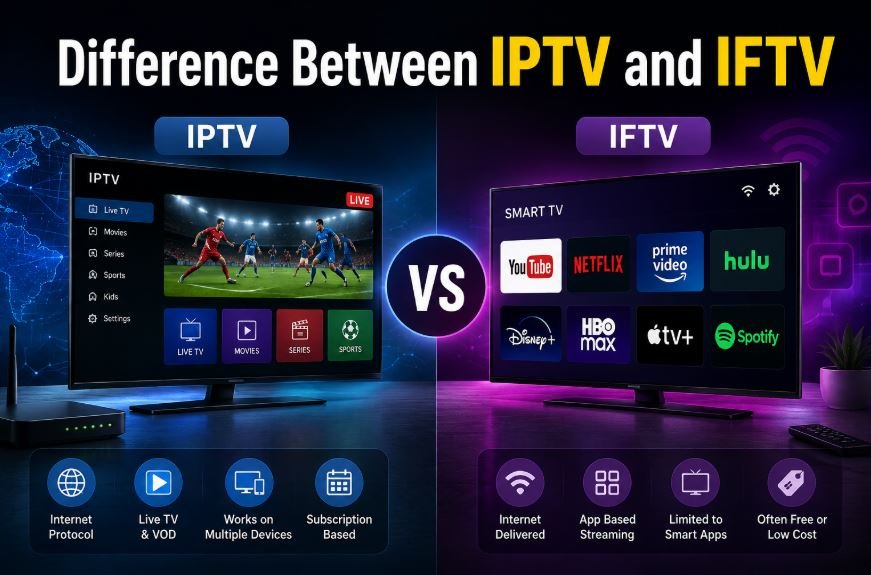
Because the content stays inside this controlled intranet, IFTV typically does not consume your regular broadband data quota. Users can watch hours of live TV without worrying that their data plan is being eaten up. BSNL’s version has offered access to more than 500 live channels in many regions, with reports of higher numbers in later packages. It is designed primarily for Android smart TVs (often Android 10 or higher) and is activated through a simple consent or app process for eligible FTTH customers.
In early phases the service has frequently been offered free or at a very low cost to existing Bharat Fiber users, with plans to add Pay TV options and popular OTT platforms.
IPTV VS IFTV | The Core Technical Differences
Here is a clear side-by-side look at IPTV VS IFTV:
| Feature | IPTV | IFTV |
|---|---|---|
| Delivery network | Public or shared broadband internet | Dedicated intranet on fiber network |
| Data consumption | Usually counts against your data plan | Does not use regular FTTH data allowance |
| Stability & buffering | Depends on internet speed and congestion | Managed channel – smoother and more consistent |
| Device compatibility | Smart TVs, phones, tablets, streaming boxes | Mainly Android smart TVs (version 10+) |
| Content style | Live channels + strong VOD libraries | Strong focus on live TV (500+ channels) |
| Availability | Wide – any suitable broadband connection | Limited to specific FTTH networks and regions |
| Typical cost | Monthly subscription fees | Often free or low-cost for eligible FTTH users |
| Setup complexity | Usually just install an app | Needs compatible TV + activation on FTTH line |
The biggest practical difference is data usage and reliability. IPTV is flexible but can feel the pressure of busy evening internet traffic. IFTV stays steady because the operator controls the path the video takes.
What Is the Difference Between IPTV and IFTV in Everyday Use?
Beyond the technical table, the real-life difference shows up in daily viewing.
With IPTV you can start watching on your phone while commuting, continue on a tablet at home, and finish on the living-room TV—provided you have internet. The downside is that heavy viewing can drain your data pack or cause buffering if your connection is shared with other household devices.
With IFTV the experience is closer to traditional cable in reliability, but without the data worry. You sit in front of a compatible Android TV, open the official app, and enjoy live channels that do not touch your broadband quota. The limitation is that you are mostly tied to that specific television and the regions where the service is active.
Pros and Cons of IPTV and IFTV
Advantages of IPTV
- Works on almost any internet-connected device
- Large on-demand libraries and international content in many packages
- Easy to switch providers or try free trials
- Portable—watch at home, at a friend’s place, or while traveling
Disadvantages of IPTV
- Streaming usually consumes data
- Quality drops when the internet is slow or congested
- Some services have inconsistent channel lists or reliability
- May require extra hardware or paid apps
Advantages of IFTV
- Zero impact on your regular data allowance
- Stable high-quality streams thanks to dedicated fiber path
- Often free or very affordable for existing FTTH customers
- Growing support for popular OTT apps alongside live channels
- Ideal for households that watch a lot of live television
Disadvantages of IFTV
- Currently limited to certain cities and states
- Mainly supports specific Android smart TVs
- Less emphasis on deep on-demand libraries in early versions
- Requires a qualifying fiber connection from the provider
IPTV VS IFTV Examples with Details
Real situations make the differences clearer.
Example 1 – The data-conscious family A family of four has a 100 Mbps BSNL FTTH plan with a monthly data limit. The parents watch news and serials every evening while the children stream educational videos. With regular IPTV the family’s data pack would shrink quickly. Switching to IFTV lets the parents enjoy 500+ live channels without touching the data quota, leaving plenty of bandwidth for the children’s online classes and homework.
Example 2 – The sports fan who travels Rahul follows cricket and football matches closely. He often watches on his phone while traveling for work. IPTV is perfect for him because he can open the app anywhere there is internet and never miss a live game. IFTV would not help him on the road because it is tied to the home fiber connection and a specific smart TV.
Example 3 – Rural or semi-urban household with limited data In areas where internet speeds are moderate and data packs are expensive, IFTV shines. Users get clear live channels without buffering worries or extra data costs. IPTV would force them to keep a close eye on data usage or upgrade to a costlier unlimited plan.
Example 4 – Urban apartment with multiple devices In a city flat with several smart TVs, phones, and laptops, IPTV offers more freedom. Different family members can watch different content on different screens at the same time. IFTV works well for the main living-room TV but may not cover every device in the house.
These examples show that neither service is universally better—the right choice depends on your lifestyle, location, and viewing habits.
Which Is the Best for You?
Answering which is the best for you requires looking at four practical factors:
- Your internet connection
- You have reliable high-speed broadband or fiber but no specific FTTH eligibility → IPTV is more accessible.
- You are an existing BSNL Bharat Fiber (or similar FTTH) customer in a supported area → IFTV is usually the smarter choice for data savings and stability.
- How you watch TV
- Mostly live news, serials, and sports on one main television → IFTV.
- Mix of live channels, movies, series, and multi-device viewing → IPTV.
- Data sensitivity
- You worry about data limits or share the connection with many users → IFTV protects your quota.
- You have unlimited data or rarely hit limits → IPTV is fine.
- Device flexibility
- You want to watch on phone, tablet, and multiple TVs → IPTV wins.
- You are happy with one compatible Android smart TV at home → IFTV works well.
Quick recommendation summary
- Best overall for most BSNL FTTH users who watch a lot of live TV: IFTV
- Best for travelers, multi-device households, and those wanting large on-demand libraries: IPTV
- Best budget and data-saving option in supported regions: IFTV
- Best flexible everyday solution available almost everywhere: IPTV
If both options are available to you, many people start with IFTV for the main living-room set and keep an IPTV app as a backup for other devices.
How to Get Started with Each Service?
For IPTV: Check with your current broadband provider or reputable third-party services. Download the recommended app, enter login details, and test a free trial if offered. Ensure your internet speed is at least 15–25 Mbps for smooth HD viewing.
For IFTV: Confirm you have an active BSNL FTTH connection in a covered area. Download the official BSNL Live TV (or partner) app on a compatible Android smart TV, give consent through the provider’s process, and activate. Availability continues to expand, so checking the latest circle-wise list is wise.
Looking Ahead: The Future of IPTV and IFTV
Both technologies are evolving. IPTV providers are improving compression and adding more 4K content. IFTV-style intranet services may expand to more operators and regions because the data-saving model is attractive. Over time we may see hybrid solutions that combine the best of both worlds—managed quality plus multi-device freedom.
Frequently Asked Questions
Does IFTV work without internet?
No. It still needs the fiber connection active, but the TV data travels on a separate intranet path and does not count against your regular data plan.
Can I use IFTV on my phone?
Generally no. It is designed for compatible Android smart TVs. Mobile users may look at related services such as BiTV in some regions.
Is IPTV legal?
The technology itself is legal. Always choose licensed providers and avoid unauthorized channel lists.
Will IFTV replace traditional cable completely?
It is a strong alternative for fiber users, but cable and satellite still serve areas without good broadband.
Conclusion
The difference between IPTV and IFTV comes down to network type, data impact, and flexibility. IPTV offers wide device support and rich on-demand content over the regular internet. IFTV delivers stable live channels over a dedicated fiber intranet without using your data quota.
Through the IPTV VS IFTV examples and the decision guide above, you now have a clear picture of which is the best for you. Match the service to your connection type, viewing habits, and data concerns, and you will enjoy better television without unnecessary frustration or extra costs. Check your local provider’s current offerings, try the service if a trial is available, and enjoy the modern way of watching TV.
One thought on “Difference Between IPTV and IFTV | Complete Guide to IPTV VS IFTV”