
Many people searching for streaming options hear the terms Kodi and IPTV used together. Some even think they are the same thing. They are not. Understanding the difference between Kodi and IPTV helps you choose the right tool for your needs, avoid common setup problems, and stay on the right side of the law.
This guide answers what is the difference between Kodi and IPTV in clear, simple language. You will see a full comparison, pros and cons of each, real examples, a comparison chart, advice on which is better for different users, and answers to frequent questions.
The Definition of IPTV and Kodi
Everything is written for easy reading and practical use.
What Is Kodi?
Kodi is a free, open-source media center application. It started years ago as XBMC and has grown into one of the most flexible media players available. Kodi does not provide any movies, TV shows, or live channels by itself. It is simply a powerful player and organizer.
You can use Kodi to:
- Play video, music, and photo files stored on your computer, hard drive, or network
- Organize large personal media libraries with artwork, descriptions, and metadata
- Install official add-ons that connect to legal services
- Create a full home-theater experience on almost any device
Kodi runs on Windows, macOS, Linux, Android, Fire TV, Raspberry Pi, and many other platforms. Its strength is customization. Users can change skins, add widgets, set up scrapers for metadata, and build a personalized interface.
Important note: Kodi itself is completely legal. The official software does not include any copyrighted content. Problems only arise when people install third-party add-ons that link to unauthorized streams. The Kodi project does not support or allow discussion of those add-ons on its official channels.
What Is IPTV?
IPTV stands for Internet Protocol Television. It is a method of delivering television content over the internet using the Internet Protocol. Instead of traditional cable or satellite signals, IPTV sends live channels, catch-up TV, and on-demand content as data streams.
When people talk about an “IPTV service,” they usually mean a subscription that gives them access to live TV channels and sometimes video-on-demand libraries. These services deliver content through playlists (often M3U) or special APIs (such as Xtream Codes). Users watch through dedicated apps, set-top boxes, smart TVs, or media players.
Legitimate IPTV services operate under proper licenses and often come from telecom companies or authorized providers. They offer electronic program guides, multi-device support, and customer service. Unauthorized services that rebroadcast copyrighted channels without permission exist as well and carry legal and security risks.
IPTV focuses on delivering content. It is a service, not a media player. This delivery approach is also frequently compared in guides covering the Difference Between IPTV and OTT, the Difference Between IPTV and Streaming TV, and the Difference Between IPTV and IFTV.
IPTV focuses on delivering content. It is a service, not a media player.
What Is the Difference Between Kodi and IPTV?
The core difference between Kodi and IPTV is simple:
- Kodi is software — a media player and organizer.
- IPTV is a delivery method or service that provides the actual television content.
Kodi can play many types of media, including IPTV streams if you add the right tools. IPTV needs a player (which can be Kodi, a dedicated app, or a set-top box) to display the streams.
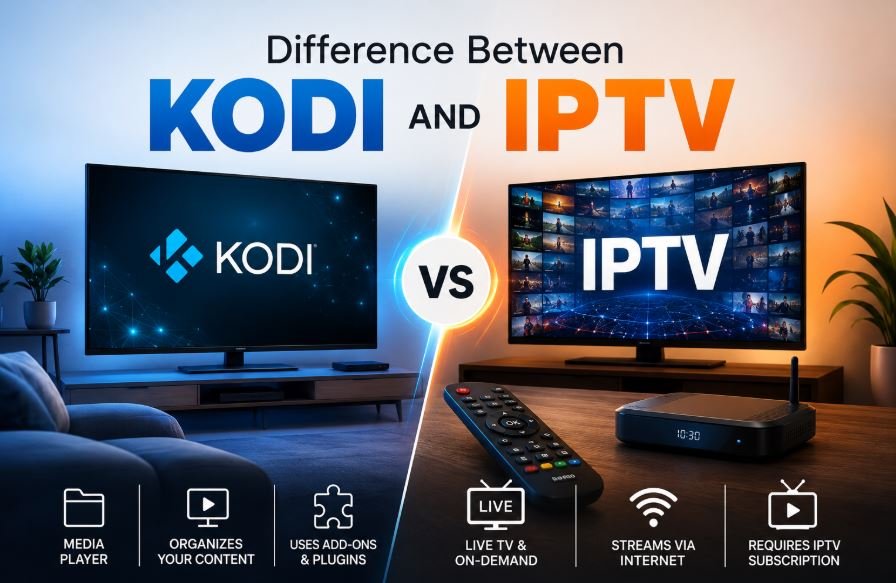
Think of it this way: Kodi is like a high-end television set with advanced features. IPTV is like the cable or satellite signal that brings channels into that set. You can use Kodi without any IPTV. You can also use IPTV without Kodi by choosing a simpler player app.
Kodi gives you full control over how content looks and is organized. IPTV gives you ready-made access to live channels and often large on-demand libraries. One is a platform you customize. The other is a content pipeline you subscribe to.
Kodi VS IPTV: Key Points Side by Side
Here are the most important practical differences:
Role Kodi acts as the media center and user interface. IPTV acts as the source of live TV and related content.
Content Kodi starts empty. You add your own files or connect legal sources. IPTV arrives with channels and often movies already included in the subscription.
Setup Kodi requires more initial work — installing the app, configuring libraries, and adding any desired features. Most IPTV services are plug-and-play: enter login details or a playlist link and start watching.
Customization Kodi offers deep customization with skins, scripts, and layouts. IPTV interfaces are usually fixed by the provider or the player app you choose.
Cost Kodi software is free. Extra costs may come from storage, legal add-ons, or a VPN for privacy. IPTV requires a paid subscription, typically monthly or yearly.
Reliability Kodi performance depends on your setup and the sources you choose. Legitimate IPTV services manage servers and aim for consistent uptime.
Legal Status Kodi is legal when used with personal media or authorized services. IPTV is legal when the provider holds proper rights to the channels and content.
Pros and Cons of Kodi and IPTV
Pros of Kodi
- Completely free to download and use
- Excellent for organizing large personal media collections
- Highly customizable appearance and features
- Works across many devices and operating systems
- Supports local playback, network shares, and legal streaming add-ons
- Can integrate IPTV streams if you want a single interface
- Active community and regular official updates
Cons of Kodi
- Steeper learning curve for beginners
- Requires time to set up and maintain
- No content included by default
- Third-party unofficial add-ons can break, carry security risks, or lead to legal issues
- Live TV experience needs extra configuration and is less polished than dedicated players
Pros of IPTV
- Ready access to live channels, sports, news, and often on-demand libraries
- Simple setup with most modern apps
- Electronic program guide (EPG) usually included
- Designed specifically for television-style viewing
- Multi-device support and catch-up features on many services
- Customer support from legitimate providers
Cons of IPTV
- Requires a paid subscription
- Quality and channel availability depend on the provider
- Unauthorized services risk account bans, malware, or legal problems
- Less customization than a full media center
- Performance depends on your internet connection and the provider’s servers
Examples of Kodi and IPTV
Kodi examples and use cases
- Playing a personal movie and TV show library stored on a hard drive or NAS
- Building a home theater PC with beautiful skins and automated metadata
- Using official add-ons for YouTube, Twitch, or other legal platforms
- Combining local files with a legal IPTV playlist through the official PVR IPTV Simple Client
- Running on a Raspberry Pi as a low-power media center
IPTV examples
- Telecom-provided IPTV services that come bundled with home internet
- Legitimate subscription services that deliver licensed live channels and VOD
- Apps such as TiviMate, IPTV Smarters, or OTT Navigator used with authorized playlists
- Enterprise or hospitality systems that stream channels over managed networks
- Hybrid services that offer both live TV and on-demand content under proper licenses
- Some Popular IPTV names: Pixzo TV, Roku TV, Polu TV, StreamView IPTV etc.
You can even use both together: subscribe to a legitimate IPTV service and load the playlist into Kodi if you prefer its interface and library features.
Kodi VS IPTV Comparison Chart
| Feature | Kodi | IPTV |
|---|---|---|
| What it is | Free open-source media player and center | Content delivery service for live TV and VOD |
| Content included | None by default | Channels and often movies/series via subscription |
| Main strength | Customization and local media library | Live TV reliability and program guide |
| Setup difficulty | Moderate to high | Low (usually login and play) |
| Cost | Free software | Paid subscription |
| Device support | Very wide (PC, Android, Fire TV, etc.) | Wide (apps, boxes, smart TVs, mobiles) |
| Customization | Extremely high | Limited to provider or player app |
| Live TV quality | Depends on sources and setup | Managed by the provider |
| Legal status | Legal software; depends on sources used | Legal when provider has proper rights |
| Best for | Media collectors and power users | Viewers who want ready live channels and sports |
| Maintenance | User manages updates and sources | Provider handles most updates |
Which Is Better for Your Streaming: IPTV or Kodi?
There is no single winner. The better choice depends on your goals and technical comfort.
Choose Kodi if:
- You have a large collection of personal movies and shows
- You enjoy customizing every part of the interface
- You want one place to manage local files, network media, and selected streams
- You are comfortable with occasional setup and troubleshooting
- You prefer a free platform and are willing to invest time
Choose IPTV if:
- You mainly want live TV, sports, news, and a traditional channel guide
- You prefer simple setup and minimal ongoing maintenance
- You value consistent stream quality and customer support
- You want a cable-like experience without the cable bill
- You prefer a managed service over building everything yourself
Many people use both. They keep a legitimate IPTV service for reliable live channels and sports, then use Kodi as the central media hub for personal files and extra features. This combination gives the best of both worlds when done with authorized content only.
Always prioritize legal sources. Unauthorized streams can lead to unstable service, security risks, and potential legal consequences. Stick to official Kodi repositories and properly licensed IPTV providers.
Frequently Asked Questions
What is the main difference between Kodi and IPTV?
Kodi is a media player software. IPTV is a service or method that delivers television content over the internet. Kodi plays content; IPTV provides content.
Is Kodi the same as IPTV?
No. Kodi can play IPTV streams with the right configuration, but they are different things. One is software, the other is a content delivery approach.
Is Kodi legal?
Yes. The official Kodi software is completely legal. Using it with your own media files or authorized services is fine. Installing unofficial add-ons that access copyrighted content without permission is not legal.
Can I use IPTV inside Kodi?
Yes. The official PVR IPTV Simple Client add-on lets you load compatible playlists. Setup takes some time but works well for users who want everything in one interface.
Which is easier for beginners?
IPTV with a dedicated player app is usually easier. Kodi offers more power but requires more initial learning.
Do I need a VPN with Kodi or IPTV?
A reputable VPN can add privacy on public networks and help with geo-restrictions on legitimate services. It does not make unauthorized content legal.
Which is better for live sports?
A quality legitimate IPTV service is generally more reliable for live sports because the provider manages the streams and servers.
Can Kodi replace a full IPTV service?
Only if you already have legal sources or personal recordings. Kodi does not supply channels by itself.
Conclusion
The difference between Kodi and IPTV is clear once you separate the roles. Kodi is a free, highly customizable media center that organizes and plays content you already have or legally connect. IPTV is a service that delivers live television and related content over the internet.
Kodi rewards users who enjoy control and personal media libraries. IPTV rewards users who want ready access to live channels with less setup. Many streaming fans combine the two for a complete experience — using authorized IPTV for live TV and Kodi as the flexible front end.
When choosing, focus on your main needs: ease of use, live TV reliability, personal media organization, or customization. Always stay with legal sources. Official Kodi software and properly licensed IPTV providers give you a powerful, safe, and enjoyable streaming setup without unnecessary risks.
Whether you pick Kodi, IPTV, or both, understanding their differences helps you build a streaming solution that actually works for you.
2 thoughts on “Difference Between Kodi and IPTV | Complete Guide for Streaming Fans”